
Table of Contents
15 min read
School Bus GPS Tracking: Routes, Driver Accountability & Incident Evidence
A school bus or passenger transport operation needs real-time route tracking, parent ETAs, ridership records, driver identification and timestamped…


The Five Questions Every Passenger Fleet Operator Must Be Able to Answer
Running a school bus or passenger fleet means being accountable in ways a delivery operation never faces. A parcel can be rescheduled; a child waiting at a stop cannot. Five distinct operational questions define that accountability, and every piece of equipment and software a passenger fleet operator chooses should be evaluated against them.
1. Where is the bus right now against its route? Not just a dot on a map, a dot on this route, measured against the schedule it was assigned. A delivery fleet can absorb a five-minute detour quietly; a school bus running off-route or behind schedule triggers calls within minutes.
2. What are parents being told about arrival at their stop? Parents and guardians need a real-time answer, not a phone call to dispatch. The question is whether the system pushes that information to them automatically, with an accurate ETA and a late alert when the bus falls behind, before they call you.
3. Who boarded and alighted, and where? Passenger-carrying liability is different in kind from cargo liability. Knowing that a specific student got on the bus at a specific stop, and got off at the right one, is a legal and duty-of-care requirement. A GPS fix on the vehicle is necessary but not sufficient; you need a record tied to the individual passenger.
4. Who was driving at any given moment? A rotating driver roster (substitutes, split shifts, agency drivers) means vehicle location alone does not tell you who was responsible for the vehicle at a given time. Driver identification, logged at the moment the vehicle moves, is the answer to every "who was driving when…" question that follows an incident.
5. What exactly happened at the moment being disputed? A parent, a school, an insurer, or a court will ask for a precise account of a specific moment. GPS breadcrumbs establish position and speed; a dashcam record establishes what was actually happening inside and outside the vehicle at that second.
These five questions are structurally different from the pressures on a freight or field-service fleet. Freight runs on flexible windows; school buses run on fixed timetables with no tolerance for "close enough." Freight customers call if a delivery is late; parents call, and escalate, when a bus is late. Cargo does not board the wrong vehicle; a child can. And when something goes wrong, the standard of proof demanded is higher because the people involved are minors in a duty-of-care relationship.
The rest of this article maps specific equipment and platform capabilities to each of these five questions. Btracking's ProFleet platform addresses all five through a combination of real-time GPS tracking, route and stop assignment, passenger ridership recording, driver identification, and AI dashcams, the sections that follow explain how each layer works and what to look for when specifying a system.
Getting the Bus onto the Platform: Telematics Gateway Selection
A bus or coach requires a wired telematics gateway, not a plug-in OBD dongle, because transit and coach architectures demand a permanent, hardwired installation that can reach J1939/JBUS data, survive the vehicle's duty cycle, and support the I/O depth that passenger operations require. Plug-in devices are designed for light vehicles with accessible OBD ports and no expectation of door sensors, driver ID hardware, or ridership integrations; a gateway is the correct starting point for any bus application.
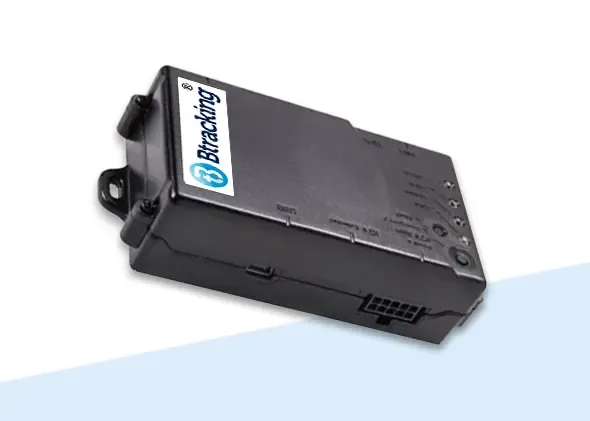
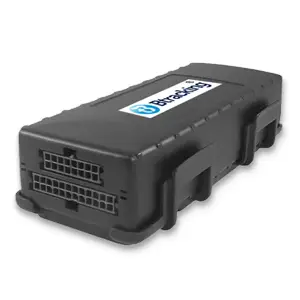
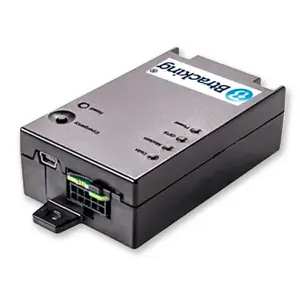
The three gateways below cover the full range of bus and coach use cases, but they do not all run the same platform. Platform tier is the single most important selection criterion: the BTPLUS ProFleet Truck Tracker | Telematics Gateway and the BTSTX ProFleet Truck Tracker | Telematics Gateway are exclusively ProFleet devices, the platform tier that runs ParentLink for assigned-ridership student tracking. The BT364 Deluxe Truck Tracker | Telematics Gateway runs Standard or Enterprise, not ProFleet.
All three gateways share the core reporting cadence a transport manager needs: one-minute GPS location updates while moving (every six hours when stopped, customizable). The accelerometer on the ProFleet units covers sudden acceleration, sudden lane crossing, sharp turns, and sudden braking. Timestamped event logs include engine on/off, door open/close, and impact detection, the audit trail that matters when a passenger incident is disputed.
BTPLUS and BTSTX require the ProFleet platform; BT364 requires Standard or Enterprise. Ordering the wrong device means it cannot run the platform your operation needs.
| Device | Platform Tier | Install Options | Key Capabilities | Price | Verdict |
|---|---|---|---|---|---|
| BTPLUS | ProFleet only | Wired, J1939, OBDII and aux power harness options | 1-min GPS; accelerometer (sudden accel, lane crossing, sharp turns, hard braking); engine on/off, door open/close, impact detection with timestamp; Driver ID (RFID/iButton); remote safety lockout; backup battery; 3 digital inputs, 1 analog input, 2 digital outputs (expandable) | $239.99 | Buy |
| BTSTX | ProFleet only | Wired, J1939, OBDII and aux power harness options | 1-min GPS; accelerometer (sudden accel, lane crossing, sharp turns, hard braking); engine on/off, door open/close, impact detection with timestamp; Driver ID (RFID/iButton); internal analog temperature sensor; 4 digital inputs, 1 analog input, 2 digital outputs (expandable) | $219.99 | Buy |
| BT364 | Standard or Enterprise | , | Driver behavior (speed, harsh driving, impact detection); programmable audible warnings; comprehensive vehicle data (fuel level, coolant temp, RPM, DTC codes, tire pressures, DEF levels, and more); WiFi and BLE for integrated dashcams; Driver ID (Fob, HID/RFID, Dallas Key); fully programmable I/O | $239.99 | Consider |
BTPLUS, Verdict: Buy for a school bus operator running ProFleet. At $239.99 it delivers the full ProFleet feature set (including the remote safety lockout, backup battery, and the I/O capacity for door and driver-ID hardware) on the platform tier that supports ParentLink.
BTSTX, Verdict: Buy for a school bus operator running ProFleet who wants the same platform at $219.99. The BTSTX includes an internal analog temperature sensor and four digital inputs in its base configuration; the $20 saving over the BTPLUS is modest, so the choice between the two comes down to which I/O layout better matches the specific vehicle wiring.
BT364, Verdict: Consider for a charter or shuttle operator with no assigned ridership. A charter or shuttle operation carries no named passengers on a fixed manifest, so the ParentLink ridership system is not relevant and ProFleet is not a necessary expense. The BT364 at $239.99 on Standard or Enterprise delivers deep vehicle diagnostics (fault codes, tire pressures, DEF levels, transmission fluid temperature, and more) alongside driver behavior monitoring and BLE/WiFi for dashcam integration. It is a legitimate and well-specified choice for that use case; the condition is simply that the operation has confirmed it does not need ProFleet.
Subscription pricing starts from $12.95/month per vehicle on the Standard platform with no contracts; see what fleet GPS actually costs for the full tier breakdown. All hardware carries a lifetime warranty. ELD compliance is a separate product category and is addressed by dedicated ELD devices, not by these telematics gateways alone.
Parent ETAs and Ridership: The ParentLink System
The ParentLink App is the direct answer to both parent-communication and ridership-record requirements for school bus and student passenger operations. The system runs on the ProFleet platform and is priced by quote, operators contact Btracking with their requirements to receive a proposal.
How the System Is Built
Setup begins in ProFleet: buses are assigned to routes, and students are assigned to specific stops on those routes. That stop assignment is what drives every downstream notification and ETA, the app knows which stop a guardian is waiting at because the operator has defined it in the platform.
What Parents See
The ParentLink App is free for Android and iPhone. Once a guardian is connected to a student's profile, the app provides:
- A live map showing the bus in real time
- The ETA to the student's assigned stop, with an alert if the bus is running late
- Boarding and drop-off notifications, the exact time and location when the student gets on and off, provided an on/off ridership method is active on that route
- Past ridership data so guardians can review a student's travel history
Three Ways to Record Ridership
The evidence describes three distinct methods, and the differences matter operationally:
- BLE tag, a mini waterproof tag attached to a backpack or clothing; a BLE-enabled GPS tracker installed in the bus reads it automatically as the student boards or alights.
- RFID card or HID fob, the student scans a card or fob on a card reader mounted in the bus.
- RFID card on a DriverLink tablet, the student scans an RFID card on a reader connected to a tablet running the DriverLink app. This option connects no hardware to the bus and sends no vehicle or driver-behavior data.
Because the third ridership method connects no hardware to the bus, it produces no vehicle location, speed, or driver-behavior data. Operators who also need telematics (speeding alerts, accident detection, remote lockout) must use one of the first two methods alongside a wired tracker such as the BTPLUS.
Operational Alerts
Beyond parent-facing notifications, the system records arrival time, departure time, and stop duration at every stop. Dispatchers receive running-late alerts. Two safety-oriented alerts are also built in: the system flags when a passenger who is not assigned to the route boards the bus, and when a duplicate passenger ID card is scanned, both conditions that warrant immediate attention on a student route.
Is ParentLink Right for Your Operation?
Buy, for any operator running fixed school bus routes with assigned students and guardians who need live ETAs and boarding confirmation.
Consider, for a mixed fleet where some vehicles run assigned student routes and others do not; deploy ParentLink only on the routes where student assignment exists, and pair it with a ridership method that also feeds telematics data if vehicle monitoring is required.
Skip, for charter, shuttle, or on-demand operations with no pre-assigned riders. Boarding notifications in ParentLink depend entirely on students being assigned to stops in advance; without that assignment structure, the core value of the system does not apply.
Driver Accountability: Identifying Who Is at the Wheel
Automatic Driver ID resolves the question of who was at the wheel at any recorded moment, closing the gap that shift changes and substitute drivers routinely open in a fleet's accountability record.
Both the BTPLUS ProFleet Truck Tracker and the BTSTX ProFleet Truck Tracker support automatic Driver ID through two identification methods: an RFID card or an iButton (Dallas key). Either method ties a named driver to the gateway the moment they take the vehicle, so every event log entry (engine on/off, hard braking, sharp turn, door open) carries a verified driver identity rather than just a vehicle ID.
Beyond identification, both units can be configured so that only authorized drivers can unlock or start the vehicle. That single configuration step turns Driver ID from a passive record into an active access control: an unauthorized person cannot simply take the wheel and drive away.
For fleets that prefer a keyless credential, the BLE Driver ID Key Fob is available separately at $24.99. It pairs with the gateway over Bluetooth and provides the same driver-attribution result without a physical card or metal key.
Driver ID identifies the person driving the vehicle and creates an accountability record tied to that individual. It is a vehicle-access and workforce-management tool: it does not track, log, or monitor passengers in any way.
The practical payoff is straightforward for any operation running shift rotations or shared vehicles. When a behavior event fires (sudden acceleration, sharp cornering, an unexpected door-open) the system already knows which driver was logged in. Supervisors can address the individual rather than the vehicle, and the driver roster stays accurate even when a substitute steps in at the last minute.
Buy, any fleet running shared vehicles or shift-based operations where attaching a driver identity to every event record is a baseline accountability requirement.
Incident Evidence: Multi-Channel Dashcam Coverage for Passenger Vehicles
A passenger vehicle creates a fundamentally different liability exposure than a delivery truck: the interior is occupied, and a disputed incident (a hard stop, a passenger fall, a near-miss at an intersection) may involve the driver, one or more passengers, and a road event all at once. A single road-facing camera captures only one of those three dimensions. When a claim lands, the footage gap is the liability gap.
That is the operational case for a multi-channel system. Four independent video channels mean four simultaneous angles of record: what the road showed, what the driver was doing, and what was happening inside or alongside the vehicle. No single channel can be played against the others, and no party to a dispute can argue the camera was pointing the wrong way.
BD2020 ProFleet 4 Channel AI Dashcam System
The BD2020 ProFleet 4 Channel AI Dashcam System is built around a road-facing FHD front camera plus up to three additional channels, one of which can be a driver-facing DMS camera. All footage is stored to a 256 GB SD card and available via live streaming on the ProFleet platform, the only platform the BD2020 operates on.
What the system detects and alerts on:
- Driver behavior events, harsh braking, harsh turning, harsh acceleration, and collision warning
- ADAS audio alerts, tailgating, lane departure, and pedestrians about to cross
- DMS warnings (when a driver-facing camera is fitted), distracted driving, fatigue, and phone use
Each of those alert categories maps directly to the incident types that generate passenger-transport claims. A fatigue warning issued in real time is a different outcome than a fatigue event discovered during a post-incident review.
For school buses and larger passenger vehicles, Btracking offers a multi-camera bus visibility configuration using wireless front, side and rear cameras. The result is a 360-degree view of both the bus interior and exterior, with video available to view within seconds, the kind of retrieval speed that matters when an incident is reported at the curb rather than in an office the next morning.
A combination version of the BD2020 pairs it with the BTPLUS telematics gateway over WiFi, bringing dashcam footage and vehicle telematics together on a single ProFleet record.
The BD2020 tracks on the ProFleet platform exclusively. If your operation already runs on Btracking's Standard or Enterprise platform, confirm a ProFleet subscription is in place before deploying this hardware.
The experience of operators who have made this switch is consistent with what the system is designed to do. A passenger transport operator that moved its dashcams and GPS tracking to Btracking from a larger platform put it directly:
"I tried many Dash Cam/GPS platforms, and the personalized service and timely communication with Btracking cannot be beat. Larger companies … overpromise and underdeliver for small business needs. If you are looking for a service that tailors to passenger carrier vehicles, Btracking can deliver.", a passenger transport operator
Buy, for any passenger transport operator who needs defensible, multi-angle incident footage and real-time driver monitoring on a single platform.
Responsible Use: Policy Obligations for Cameras, Ridership Records and Location Data
Operating cameras, ridership records and location data on a vehicle carrying children is an operational and legal matter for the school district or transport operator, not a decision that technology alone resolves.
Written policy comes first. Before any system goes live, the operator should establish a documented policy that answers, at minimum:
- Who may view footage. Camera footage from a multi-channel dashcam system covering the bus interior and exterior should be accessible only to personnel with a defined, role-based need, not open to any staff member with a login.
- How long records are retained. The operator, not the platform, must set a retention schedule for video, ridership logs and location history, and must enforce it consistently.
- Under what circumstances data may be shared. This includes sharing with parents or guardians, law enforcement, insurers, and other third parties. Each category warrants its own written rule.
Notice and consent obligations are yours to confirm. School bus operations typically intersect local, state and federal requirements covering minors, surveillance, biometric or proximity data, and parental notification. This article does not state those requirements as fact. The operator must independently confirm what notice, consent and disclosure obligations apply in their jurisdiction before deploying cameras, BLE ridership tags, RFID card readers or the ParentLink App.
Understand what ridership data does and does not show. When the system records a boarding or alighting event, it captures the time and location of that event at the bus, the moment a student scans a card or a BLE tag is read at the vehicle door. It does not track the location of a child away from the bus. Policies and parent communications should reflect that distinction accurately, so guardians understand the scope of what the system provides.
Guardian-facing data deserves its own review. The ParentLink App shares the bus's real-time location, ETA at the student's assigned stop, and boarding and alighting notifications with guardians. Any policy governing that data channel, including what happens to a guardian's account when a student leaves the program, should be written down and communicated before the app is distributed.
A dashcam system recording the bus interior and exterior generates sensitive footage involving minors. Technical access controls are a starting point, not a substitute for a written policy that specifies retention, access rights and disclosure rules reviewed by qualified legal counsel.
Frequently asked questions
How does GPS tracking for school buses work?
A wired telematics gateway installed in the bus sends a GPS location every minute while moving, along with timestamped event logs for engine on/off, door open/close and impact detection. On the ProFleet platform, that live position feeds the ParentLink App so guardians can see the bus on a map and receive an ETA to their assigned stop.
What is the ParentLink App and how do parents use it?
ParentLink is a free app for Android and iPhone that shows the bus on a live map, displays the estimated arrival time at the student's assigned stop, sends late alerts, and, when an on/off ridership method is in use, notifies guardians of the time and location when a student boards or exits the bus. Past ridership data is also accessible through the app.
What ridership methods does the Btracking school bus system support?
Three methods are available: a mini BLE tag worn on a backpack or clothing read by the bus's BLE-enabled tracker; an RFID card or HID fob scanned on a reader installed in the bus; or an RFID card scanned on a tablet running the DriverLink app. The tablet option sends no vehicle or driver-behavior data and is unsuitable where telematics are also required.
Can the system prevent an unauthorized driver from operating a school bus?
Yes. Automatic Driver ID using an RFID card or iButton can be configured so that only authorized drivers are able to unlock or start the vehicle. A BLE Driver ID Key Fob is also available separately at $24.99. Every recorded event and behavior log is associated with the identified driver.
Do I need the ParentLink ridership system for a charter or shuttle operation?
No. A charter or shuttle operation with no assigned riders requires a telematics gateway and optionally a dashcam, but not the ridership system. In that case the BT364, which runs on the Standard or Enterprise platform, is a practical alternative to the ProFleet-only BTPLUS or BTSTX and avoids paying for platform features the operation will not use.
Products in this guide
Get a written quote
Tell us what you run. An engineer confirms the details and prices it.
Request a quote